
The QWERTY Keys and the System Built to Slow You Down
What was the QWERTY keyboard?
In 1873, Christopher Latham Sholes created the QWERTY layout to slow typists down. Fast typing caused mechanical type bars to jam, so he separated common letter pairs to force longer hand movements. The system was built to protect the machine, not accelerate the human.How a mechanical problem from 1873 became the permanent speed limit on human thought
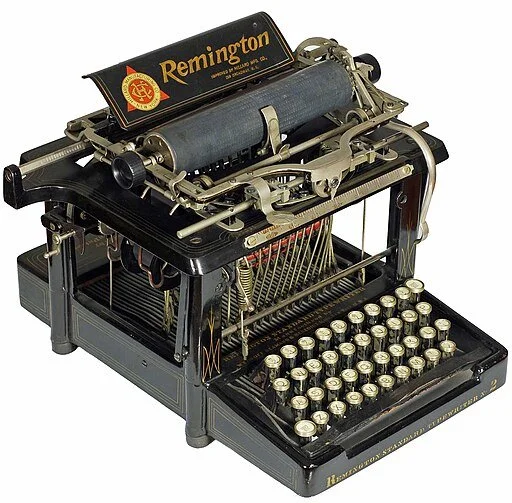
Remington 2 typewriter, 1878 Image Credit: Martin Howard, CC BY-SA 4.0 <https://creativecommons.org/licenses/by-sa/4.0>, via Wikimedia Commons
The keyboard under your fingers right now was designed to make you slower.
In 1873, Christopher Latham Sholes faced a mechanical crisis with his new typewriter. When typists worked too fast, the metal type bars would swing up, collide mid-air, and jam together in a tangled mess. The faster the typist, the more frequent the breakdown. So Sholes redesigned the keyboard layout to separate commonly used letter pairs as far apart as possible. He forced the human hand to travel farther distances. He turned efficiency into a liability. The QWERTY layout wasn't invented to help you type faster. It was engineered to slow you down just enough to keep the machine from breaking itself.
The Job: The Type-Writer
Before QWERTY became standard, the role of the Type-Writer, yes, that's what they called the person, not just the machine, was one of constant physical negotiation. They had to memorize the alphabetical keyboard layout, develop rapid finger coordination, and then immediately slow down the moment the keys started to tangle. It was a job of deliberate restraint. Speed was your skill, but stopping was your survival. The Type-Writer had to learn to "feel" when the machine was about to jam and pull back just before the collision. They were managing the limitations of the tool, not the complexity of the work.
When QWERTY was introduced, it didn't make the job easier. It made the job safer for the machine. The Type-Writer's role shifted from high-speed transcription to mechanically compliant operator.You could type all day without jamming the keys, but you could never type as fast as your brain could think. The system had placed a permanent speed limit on your cognition, and we called it progress.
Modern Correlation
Today, we no longer have mechanical type bars that jam, but we still use QWERTY. We've kept a system designed for a problem that no longer exists. In the Leadership Cartography™ framework, this is a Precision™ pathway failure. Precision leaders optimize for efficiency, but they often inherit systems that were never built for speed in the first place. We treat QWERTY as neutral infrastructure, but it's not. It's a 150-year-old constraint we've naturalized into invisibility.
If you manage a team that uses project management tools, status update templates, or approval workflows that slow decision-making, you are living inside a modern QWERTY system. The tool was designed to prevent a problem.Maybe it was scope creep, maybe it was accountability gaps, maybe it was legal risk, but the problem it solved is long gone. What remains is the friction. Your team's hands are still moving farther than they need to because no one has questioned whether the layout still serves the work.
If the system you're using was designed to prevent a breakdown that no longer happens, are you leading with Precision, or are you just maintaining the machine?

Discovery: Map Your Natural Terrain
Not sure if you are optimizing systems or just protecting old ones? Your leadership style determines whether you see inherited processes as infrastructure or as historical constraints. Take the Leadership Style Quiz to see how your map is currently drawn. Understanding your natural orientation helps you identify why some systems feel sacred when they are actually just old.
Tactical: Lower the Pressure on Outdated Systems
If you are stuck managing workflows that slow your team down more than they protect the work, you need clarity to question what you've inherited. The Leadership Identity Map helps you develop the clarity to see which systems no longer serve, the confidence to challenge legacy processes, and the care to rebuild without destabilizing your team. It gives you the tools to stop maintaining old machines and start leading with intention.
Subscription: Join The Map Drawer
Need a permanent place to store your leadership insights? The terrain of management changes with the seasons. Join The Map Drawer for a standing library of leadership maps that update every month to match the specific pressure of the current season. Instead of hunting for a solution when the terrain gets steep, you will already have three new tools waiting.