
How Do I Track Employee Time Off Without Losing Coverage?
You need to know who is out next week.
The answer should be easy. Instead, the information is spread across emails, calendar holds, verbal requests, text messages, HR records, and the note you wrote down during a rushed conversation. An employee time off tracker becomes useful when coverage planning starts depending on memory instead of a clean record.
The problem usually shows up when the schedule is already tight. One person has approved PTO. Another asked about taking Friday off but never sent the formal request. Someone else is on sick leave, and a coverage gap is forming before anyone has said it out loud.
Why employee time off gets hard to track
Time off is simple when the team is small, requests are rare, and the manager can remember every moving piece.
That does not last.
Once the team has overlapping PTO, sick leave, remote days, partial days, and pending requests, the manager needs more than a calendar. A calendar can show who is out. It does not always show request status, approval history, leave type, remaining coverage, or where the schedule is already thin.
This is where managers lose track. The information exists, but it is not held in one usable place. A request may be approved in one system, discussed in another, and remembered by one person. The risk is not always the leave itself. The risk is the gap between what has been requested, what has been approved, and what coverage still needs to happen.
A manager can care about flexibility and still need structure. The structure protects the team from last-minute scrambling and protects the manager from becoming the only person who knows what is going on.
What scattered PTO tracking costs
Scattered time off tracking creates avoidable pressure.
The manager spends time rechecking old messages, asking employees to confirm dates, reviewing the calendar, and rebuilding the same information before every schedule decision. That work does not feel large in the moment, but it repeats.
Coverage starts to depend on whoever remembers the most.
That creates uneven decisions. One employee’s request gets handled quickly because it was easy to find. Another request sits too long because it was buried in email. A third person assumes their time off was approved because the conversation happened verbally.
The team feels the drift when schedules get thin. Work gets redistributed late. The person covering finds out too close to the absence. Small misses start to feel personal, even when the cause is a tracking problem.
Managers also lose the ability to see patterns. Frequent absences, peak leave periods, repeated coverage strain, and pending approvals are harder to read when the information is split across too many places.
What changes when time off is tracked in one place
A clear tracker gives the manager a working view of leave before it becomes a coverage issue.
You can see who is out, what kind of leave they are taking, whether the request is pending or approved, and where coverage may need attention. The point is practical. The manager needs enough visibility to make schedule decisions without rebuilding the record every time.
A good tracker also reduces the emotional weight around leave decisions.
When the information is organized, the manager can talk about coverage, timing, and approval status without relying on memory. That makes the conversation cleaner. It also gives employees a more consistent process for how requests are recorded and reviewed.
Employee PTO and Leave Tracker Excel Template
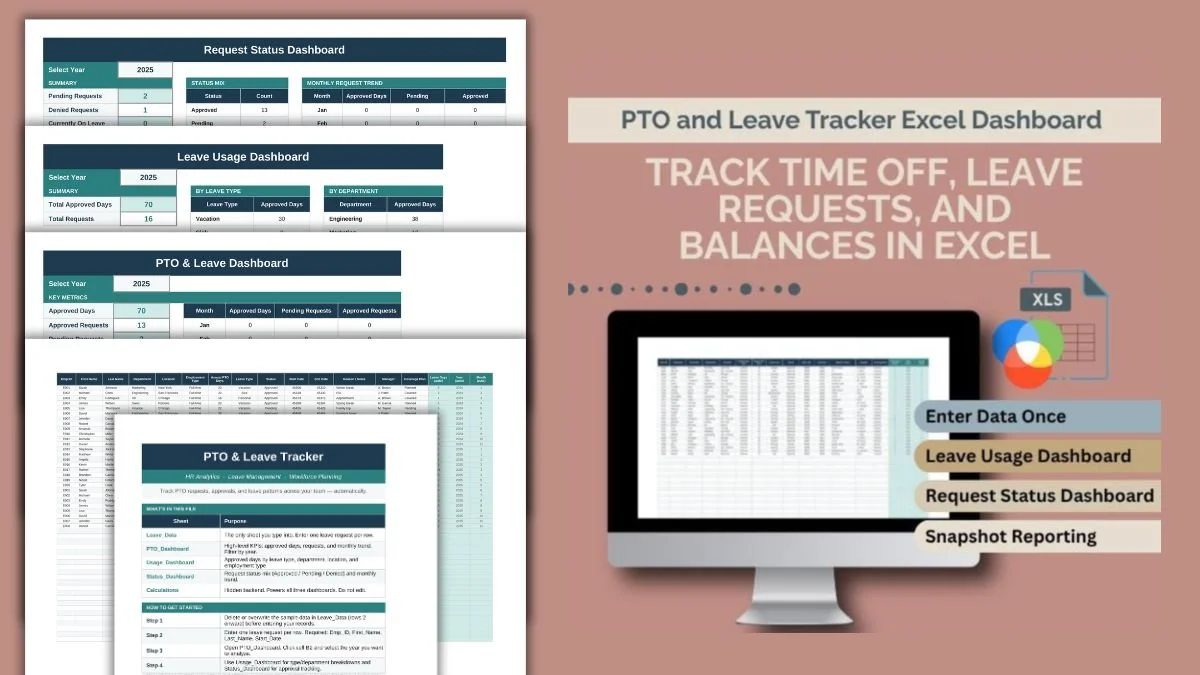
A spreadsheet for tracking vacation, sick leave, PTO requests, approval status, and leave patterns in one place.
It is built for managers, small business owners, HR teams, and team leads who need a simple way to see time off without building a spreadsheet from scratch. The workbook gives you a practical record of employee leave so coverage planning does not depend on scattered notes or memory.
It helps you track the pieces that usually get separated:
Employee names, departments, and leave details.
PTO, vacation, sick leave, personal days, and other leave types.
Request status, including pending, approved, denied, or completed.
Time off dates and duration.
Leave patterns that may affect coverage planning.
The tracker works best when it becomes the place where time off information gets recorded after a request is made. It does not need to replace your company’s formal HR system. It gives the manager a usable working view for planning, follow-up, and coverage decisions.
Is This Tool for You?
This tool is for you if you manage schedules, review time off requests, or need a clearer way to see who is out and when.
It is especially useful if PTO requests come from several places, if you manage a small team without a strong HR system, or if coverage planning keeps happening too late. It also fits managers who need a simple spreadsheet they can keep open, update quickly, and use during weekly planning.
Use this tool when the problem is visibility. You need one place to record time off, check approval status, and see where coverage may need attention.
You need a different route if your main issue is employee attendance behavior, repeated lateness, or performance concerns tied to absence patterns. A PTO tracker can show the record. It does not replace a formal attendance policy, HR guidance, medical leave compliance, or a documented performance process.
It also does not decide whether a leave request should be approved. That decision still depends on your organization’s policy, local laws, role coverage, and the employee’s situation.
Choose Your Next Route
A tool only works if it fits the hand using it.
You have the tactical fix for the friction. Now, make sure you know how to wield it. Get Your Map to see how your inherent orientation interacts with this terrain

If the issue runs deeper, go to Time Management Map.
For the full library, visit The Supply Post